
Agent actions
Press A on a commit in the graph to hand it to an AI coding agent: ask it something about the commit, or pick a ready-made request such as Explain branch or Resolve conflicts. tt-git starts the agent in the repository with a prompt that already says which commit, branch and files you mean.
The agent is Claude Code (claude) unless
you set another in [agent]. It runs interactively, so
you can keep talking to it once it has answered.
Asking an agent
Section titled “Asking an agent”-
Select a commit in the graph.
-
Press A, or pick Ask agent in the command palette. The Ask an agent about box opens on Custom message.
-
Type what you want, or press tab to step through the ready-made actions. The line under the input says what the selected one does. Text you type with an action selected is added to its prompt as extra instructions.
-
Press enter. esc closes the box without starting anything.
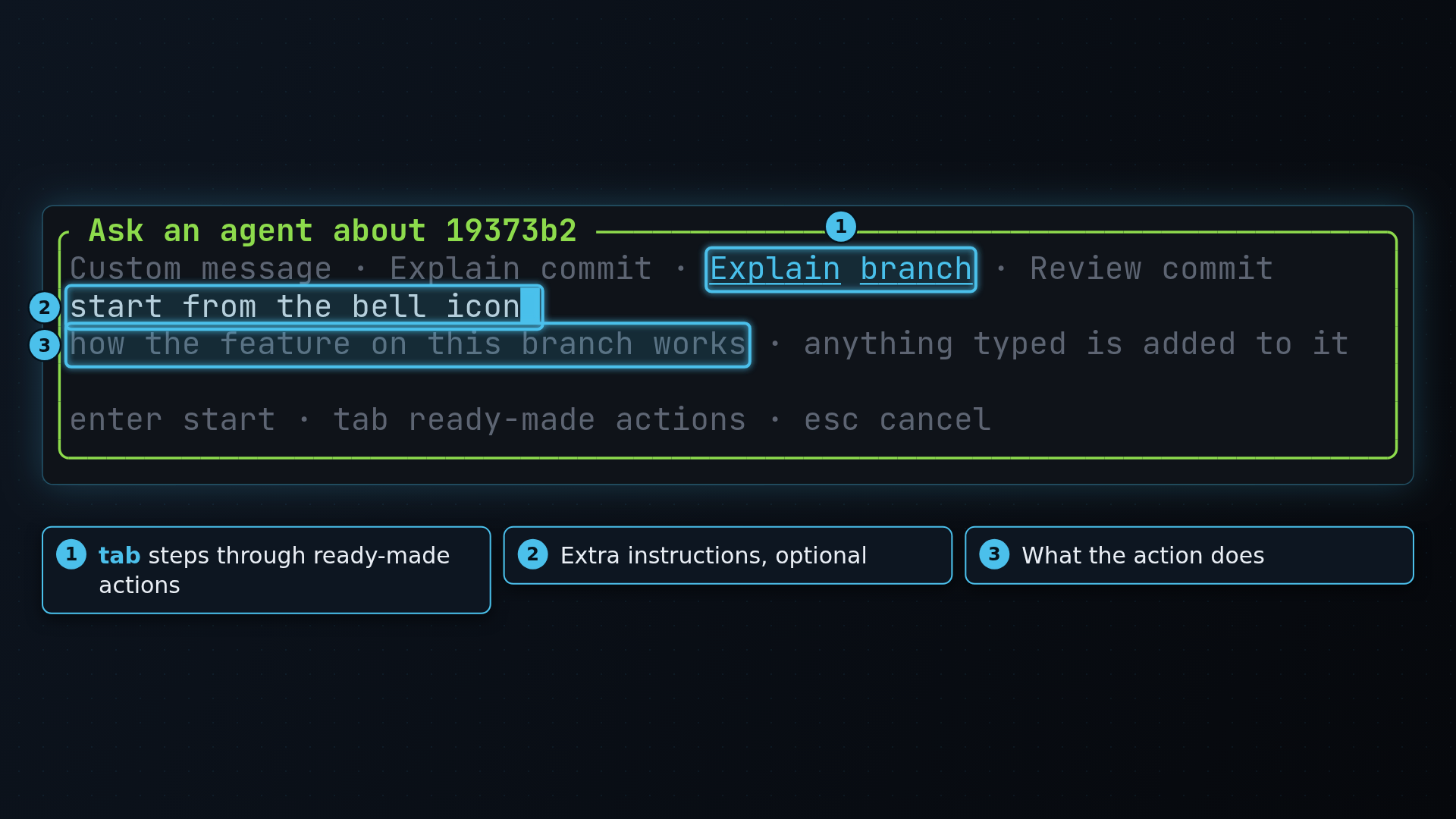
Custom message needs some text; enter does nothing while the input is empty.
The ready-made actions
Section titled “The ready-made actions”| Action | Offered | Asks the agent to |
|---|---|---|
| Resolve conflicts | only while a merge, rebase, cherry-pick or revert is stopped | read the git log of both sides, resolve every conflicted file and stage it, without committing or continuing |
| Explain commit | always | explain what the selected commit changes and why |
| Explain branch | always | explain what the current branch adds compared to the base branch and how the feature works |
| Review commit | always | look for bugs and risky changes in the selected commit |
While a merge or rebase is stopped on conflicts, Resolve conflicts comes first and is already selected when the box opens, so A then enter starts it. When it’s done, check the result in the status pane and press C to continue, as after resolving by hand. See Merge, rebase and cherry-pick.
Where the agent runs
Section titled “Where the agent runs”- Inside herdr, tt-git opens a new herdr tab named
agent: <action>in the repository and starts the agent there. herdr starts agents it knows (claude,codex,gemini,opencodeand others) itself and pastes the prompt in, so the tab shows herdr’s agent status. The help bar saysagent started in herdr tab "agent: Explain branch". - Anywhere else, the agent takes the details pane’s place, with the focus on it. Type to it as in any terminal. ctrl+\ or f12 gives the focus back to tt-git, and 4 goes back to the agent. When the agent exits, tt-git refreshes, since it may have staged or committed files; any key then closes the pane.
Only one agent runs in the details pane at a time. A while one is
running focuses it and says an agent is already running. In herdr each
request gets its own tab.
If tt-git can’t reach herdr, it opens the agent in the details pane instead
and the help bar says why. If the agent can’t be started at all (for example
claude isn’t installed), an error names the program and points at
[agent] command.
What the agent is told
Section titled “What the agent is told”The prompt is the system prompt followed by the action’s prompt (or your message), with these placeholders filled in:
| Placeholder | Becomes |
|---|---|
{repo} | the repository’s root folder |
{commit}, {subject} | the selected commit’s full hash and subject |
{branch} | the current branch (the commit hash on a detached HEAD) |
{base} | the base branch, as on the Merged and unmerged tabs |
{upstream} | the current branch’s upstream |
{state} | merge, rebase, cherry-pick or revert while one is stopped, else empty |
{conflicts} | the conflicted files, one per line |
{merge_head} | what’s being merged, rebased or picked, by name |
{log} | git log --oneline <base>..<branch>, at most 50 commits |
A {name} tt-git doesn’t know is left as it is, so braces in a prompt need
no escaping. The prompts point the agent at commits rather than pasting
whole diffs: the agent runs in the repository and reads what it needs with
git.
The default system prompt tells the agent it was started from tt-git, which repository and branch it’s in, to use git itself, and not to push or commit unless you ask.
Configuring it
Section titled “Configuring it”[agent]command = "claude" # the agent to runplacement = "auto" # "auto", "herdr-tab", "herdr-split" or "details"# system_prompt = "..." # replaces the default; "" for none
[[agent.actions]]name = "Write release notes"description = "user-facing notes for this branch"prompt = "Write release notes for what {branch} adds since {base}:\n{log}"
[[agent.actions]]name = "Resolve conflicts"when = "merging"prompt = "Resolve the conflicts in:\n{conflicts}\nStage each file. Don't commit."See [agent] for every setting. Setting
[[agent.actions]] replaces the built-in actions, so copy the ones you want
to keep.